


TL;DR:
- Great photos drive interest: Professional-looking images help listings stand out and give travelers confidence in the property.
- Use the 20/60/20 rule: Balance wide shots, room/detail photos, and lifestyle or amenity images.
- Prioritize natural light: Shoot interiors bright and clean; photograph exteriors near golden hour or twilight.
- Stage every room: Remove clutter and highlight how guests will actually use the space.
- Show what matters: Include bedrooms, bathrooms, kitchen, outdoor areas, beach access, pools, parking, and special amenities.
- Quality over quantity: Shoot 40–60 images and publish the strongest 20–30.
The single most effective upgrade you can make to a listing is a strong hero photo paired with a curated gallery of 20 to 30 images that show the guest experience, not just the architecture. If you do nothing else this week, do this: pick your best exterior or view shot as the cover, declutter every room you plan to shoot, open every blind for natural light, and hold your camera horizontal.
- Choose one hero image and one backup for A/B testing
- Declutter counters, floors, and nightstands before shooting
- Open blinds and turn on lamps for warm, layered light
- Shoot landscape orientation only, never portrait
Given that professional photography correlates with a measurable jump in bookings, a weekend of prep work is one of the better returns you’ll get from any single afternoon spent on your listing this year.
Key Takeaways
Strong vacation rental photography works because a curated hero photo and a tightly edited 20 to 30 image gallery convert browsers into bookers more reliably than a large, unedited photo dump.
| Point | Details |
|---|---|
| Hero photo drives clicks | Test two or three cover candidates and rotate based on which gets more views. |
| Shoot 40 to 60, publish 20 to 30 | Cull aggressively to avoid gallery fatigue while still covering every room. |
| Light interiors naturally, exteriors at golden hour | Never use flash indoors; save pools and facades for the last hour before sunset. |
| Pro photography pays for itself | A one-time cost rarely tops $629 and can return a 21% earnings increase over a year. |
| List where photography gets seen | Emeraldcoastbyowner gives Gulf Coast owners a fee-free, direct-booking marketplace to showcase a refreshed gallery. |
Table of Contents
- Vacation Rental Photography Tips for Staging, Light, and Gallery Order
- Camera Gear and Settings for Photographing Short-Term Rentals
- Timing Your Shoot: The Order That Prevents Reshoots
- Should You Hire a Pro? Packages, Pricing, and the ROI Math
- Editing Rules: What to Fix and What Never to Touch
- The Room-by-Room Shot List Your Gallery Actually Needs
- Why Emeraldcoastbyowner Recommends Investing in Good Photography
- Vacation Rental Photography: Practical Tips That Increase Bookings
- List Your Property With Better Photos and Reach More Direct Bookers
- Sources
- FAQ
Vacation Rental Photography Tips for Staging, Light, and Gallery Order
Good vacation rental photography sells a feeling, not a floor plan. Guests scrolling through search results are picturing themselves on that porch or in that kitchen, and your job is to hand them that picture in the first three seconds.
- Stage for lifestyle, not inspection. Set the outdoor table with plates and a pitcher of lemonade. Fold towels by the pool. A study of over 14,700 listings found that photos helping guests imagine the stay outperform photos that simply document the space, and staged lifestyle details are the easiest way to do that.
- Get your verticals straight. Crooked door frames and leaning walls are the fastest way to make a rental look amateur. Use a level or your phone’s built-in grid to keep lines true.
- Apply the rule of thirds. Position the horizon, the bed, or the pool edge along a third of the frame instead of dead center. It reads as more intentional and less like a snapshot.
- Use the 20/60/20 rule for gallery balance. Roughly 20% of your photos should be wide establishing shots (exteriors, main living spaces), 60% should be supporting detail shots (bedrooms, bathrooms, kitchen features), and the final 20% should be lifestyle and amenity shots (pool, grill, game room).
- Shoot interiors in natural light only. Never use on-camera flash. It flattens depth and casts harsh shadows that make rooms look smaller than they are.
- Save exteriors for golden hour or twilight. Shooting your outdoor spaces an hour before sunset warms up siding, decks, and pools, and twilight shots with interior lights glowing are consistently strong hero-photo candidates for beachfront and pool-heavy properties.
- Pick two or three hero candidates and test them. Rotate your cover photo every few weeks and watch which one drives more clicks. Airbnb’s own data suggests cover choice meaningfully affects click-through and, in turn, algorithmic visibility.
- Shoot wide, publish tight. Capture 40 to 60 images per property, then narrow the published gallery to the best 20 to 30. Fewer, sharper photos beat a bloated gallery every time.
- Sequence the gallery deliberately. Lead with the hero, follow with the living area, then bedrooms, kitchen, bathrooms, and finish on outdoor and amenity shots.
- Avoid over-editing. Skip filters that shift color temperature dramatically, and never digitally remove or add furniture that doesn’t exist in the space.
Pro Tip: Take your hero shot from a slightly lower angle, at roughly waist height, looking slightly upward into the room or view. It makes ceilings feel taller and spaces feel more open than they do at eye level.
Camera Gear and Settings for Photographing Short-Term Rentals
Your phone can absolutely produce professional rental images if you know a few tricks, but there’s a point where real gear starts to matter.
- Phone is enough for most single-story cottages and condos under about 1,500 square feet, especially newer phones with wide-angle lenses built in.
- Turn on gridlines in your camera settings to keep verticals straight and horizons level.
- Lock your exposure by tapping and holding on the brightest window in the frame, so the interior doesn’t blow out.
- Shoot in RAW or your phone’s “Pro” mode if available. It gives you more room to correct exposure later without losing detail.
- A true wide-angle lens (14 to 24mm on a DSLR) shows more of a room, but watch for barrel distortion that bows straight lines. A tripod, a bubble level, and basic exposure bracketing (three shots at different exposures, blended later) are what separate a hobbyist result from a listing that looks like it belongs in a magazine.
- Hire a professional with a full-frame camera and wide lens for larger homes, multi-unit properties, or any listing above your market’s median nightly rate, where the gap in image quality directly affects perceived value.
Timing Your Shoot: The Order That Prevents Reshoots
Light changes fast, and rentals rarely get photographed twice before a booking season starts. A repeatable order keeps you from missing a shot.
Shoot interiors mid-morning to early afternoon, when indirect daylight is even and shadows are soft. Save exteriors, pools, and any water views for the last 90 minutes before sunset, when golden light and twilight glow do the heavy lifting.
- Exterior and curb appeal shots first, while the sun is still high enough for clean detail shots
- Living room and main gathering spaces
- Kitchen and dining area
- Bedrooms, starting with the primary suite
- Bathrooms
- Amenities: pool, hot tub, game room, outdoor kitchen
- Detail and lifestyle shots: firepit, beach gear, welcome basket
- Aerial or drone passes, and twilight exterior shots, as light fades
Before anyone picks up a camera, run through a short pre-shoot checklist: deep clean every surface, stage each room per the tips above, test your lighting in each space at the time you plan to shoot it, secure pets off-site or in a closed room, and put away anything personal or valuable that shouldn’t appear in a public listing.
Should You Hire a Pro? Packages, Pricing, and the ROI Math
Whether to DIY or hire out comes down to your property’s price point and how much time you have.
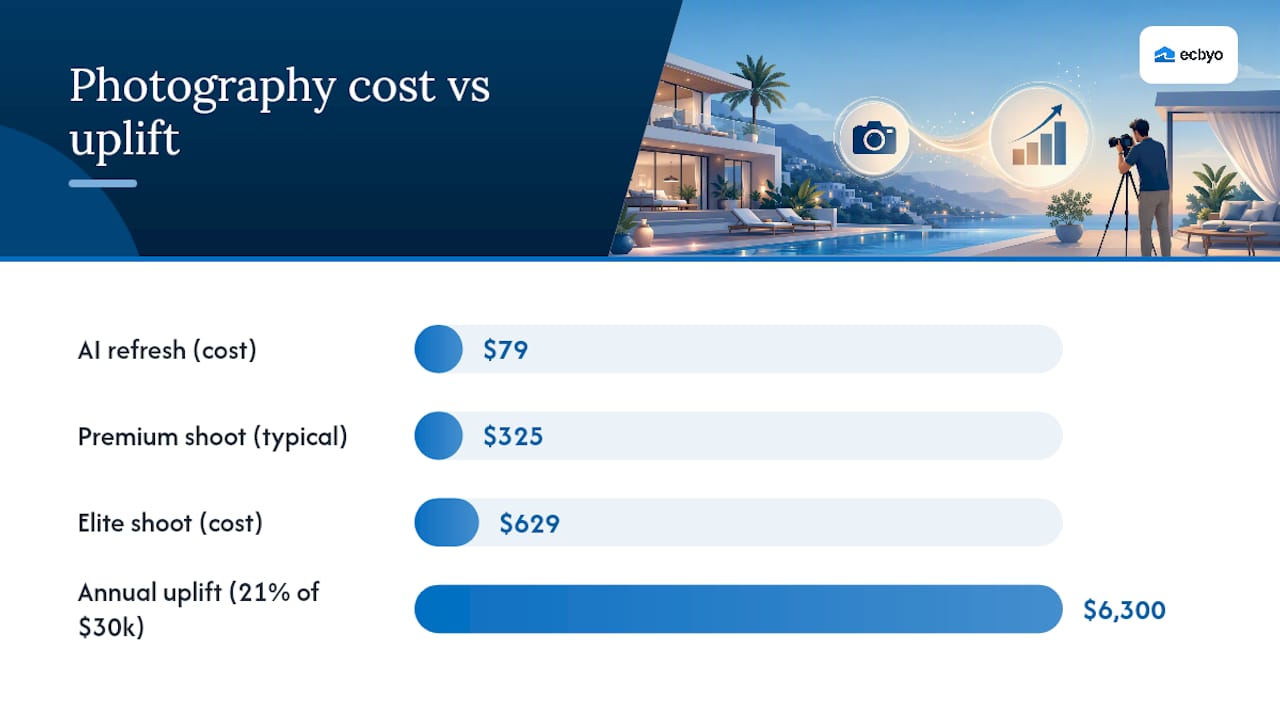
At the low end, AI-based photo refresh services can sharpen and color-correct existing images for around $79, a reasonable stopgap for a budget listing or a quick seasonal refresh. For most owners, an in-person shoot is the better long-term investment. Local photography packages typically tier like this:
| Package Tier | Typical Price | What’s Included |
|---|---|---|
| Basic | $79 | Interior and exterior photos, basic editing |
| Premium | $150 to $500 | Photos plus floor plan |
| Elite | ~$629 | Photos, floor plan, and drone or video add-ons |
That’s according to sample pricing from a rental-focused photography provider, and other markets report professional shoots running $150 to $500 depending on property size and add-ons.
On a property earning $30,000 annually, that 21% gap is over $6,000, against a one-time cost that rarely tops $629. For larger or higher-ADR properties, drone and twilight shots add measurable conversion lift that basic phone photography simply can’t replicate.
Editing Rules: What to Fix and What Never to Touch
Editing should make your rental look like itself on its best day, not like a different property.
- Correct perspective and straighten verticals so walls and door frames read as true.
- Blend or bracket exposures so windows aren’t blown out and interiors aren’t underlit.
- Grade color naturally. Warm it up slightly, but don’t shift walls or water to colors they aren’t.
- Never add or remove furniture, walls, or fixtures that change the actual layout.
- Export in landscape orientation at a minimum of 1024×683 pixels for Airbnb, since VRBO enforces its own minimum photo count and stricter upload rules.
- Name files clearly (bedroom1_king.jpg, not IMG_4021.jpg) so you can track versions across seasons.
The Room-by-Room Shot List Your Gallery Actually Needs
A complete shot list keeps you from realizing three weeks later that you forgot the laundry room a guest asked about.
- Hero exterior: capture three to five variants (straight-on, angled, twilight) to A/B test as your cover.
- Living room: wide shot showing seating capacity and any view through windows.
- Kitchen: counter space, appliances, and any unique features like a wine fridge or coffee bar.
- Each bedroom: bed configuration, closet or storage space, and natural light source.
- Each bathroom: shower/tub setup, counter space, and towel presentation.
- Outdoor and pool area: full pool or hot tub, seating, grill, and any fencing or safety gates.
- Amenities: game room, home theater, laundry, parking, EV charger, or anything that differentiates the property.
- Neighborhood context: a shot of the beach access point, dock, or street view that sets location expectations.
Prioritize views, storage space, safety features like pool fencing, and family-friendly details like a crib or high chair. Those are the details that show up in guest questions before booking, and answering them in the photos means fewer messages and faster decisions. If your property spans multiple rentable units, shoot each unit as its own complete gallery rather than mixing them, since a combined set confuses guests about what they’re actually booking.
Why Emeraldcoastbyowner Recommends Investing in Good Photography
Emeraldcoastbyowner has connected travelers directly with Gulf Coast property owners since November 2016, growing from 350 listings to thousands across Florida, Alabama, Mississippi, Louisiana, and Texas.
- Owners who upgrade their photos compete more effectively in a marketplace built on direct owner-to-guest trust, without the noise of added guest fees.
- Strong photography reduces the pre-booking questions that slow down direct bookings, since detailed property types already set guest expectations before they message you.
- Well-photographed listings in destinations like Siesta Key consistently show that outdoor and view shots do heavy lifting for coastal bookings.
Vacation Rental Photography: Practical Tips That Increase Bookings
Most advice on this topic treats every photo as equally important, and that’s backwards.
The conventional wisdom also oversells professional photography as an all-or-nothing decision. It isn’t. A $79 AI refresh on existing photos is a legitimate move for a budget listing that just needs to stop looking amateur, while a $600 package with drone footage makes sense for a beachfront home pulling premium rates. Match the spend to what the property can actually earn back.
What gets skipped almost everywhere: gallery size as a conversion lever. Publishing every photo you took, all 60 of them, exhausts guests before they reach the photo that would have sealed the booking. Shoot generously. Publish ruthlessly. That discipline, more than any lens or lighting trick, is what separates listings that convert from listings that just sit there looking pretty. Treat your own listing as an ongoing marketplace strategy, not a one-time photoshoot.
List Your Property With Better Photos and Reach More Direct Bookers
Emeraldcoastbyowner is the direct-booking alternative to fee-heavy marketplaces. Once your gallery is shoot-ready, list it where owners keep more of what they earn since guests never pay traveler service fees here, and your photos do the selling without a middleman’s markup eating into your rate.
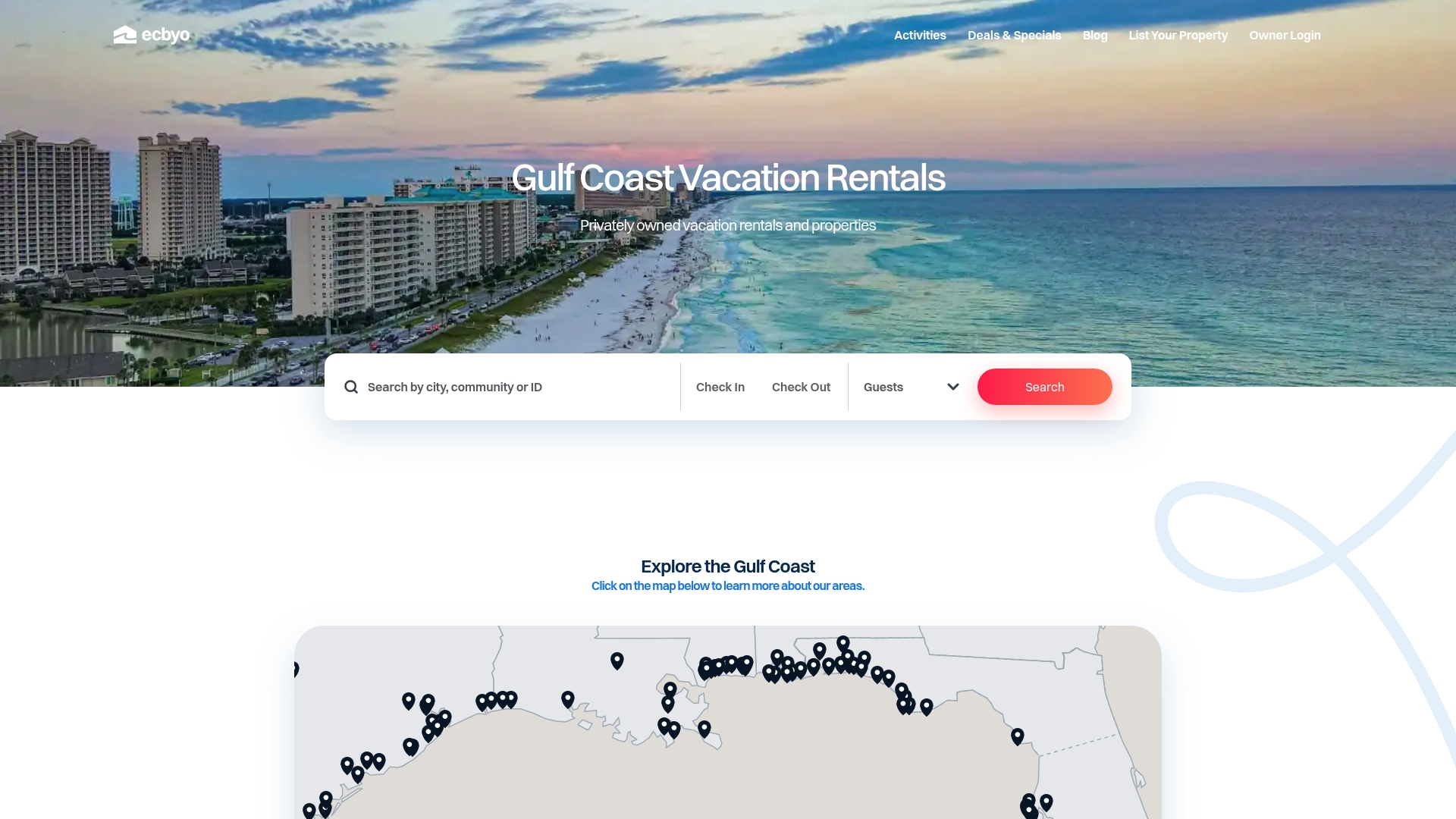
Guest browsing behavior rewards listings with a strong hero photo and a tight, well-sequenced gallery, and that’s exactly the setup Emeraldcoastbyowner’s owner profiles and detailed listing pages are built to showcase, alongside map-based search that puts your Gulf Coast property in front of travelers already searching that stretch of coast. Whether your rental sits in Florida, Texas, or Louisiana, you can also list it alongside options featured on hospitality guides covering what guests actually look for in a booking-ready home. Once your photos are edited and your gallery is trimmed to the strongest 20 to 30, list your property and start putting them in front of travelers searching the Gulf Coast directly.
Sources
- Do Better Airbnb Photos Increase Bookings? ROI Data 2026
- Vacation rental photography packages & pricing — Realiant Photography
- Short-term rental listing photos and how they affect booking rate (StaySTRA)
FAQ
Is professional photography worth it?
Yes.
Is it legal to have cameras in vacation rentals?
Most jurisdictions prohibit hidden cameras in private spaces like bedrooms and bathrooms, and platforms require hosts to disclose any recording devices in a listing; check your state’s specific surveillance laws before installing any camera.
Can I rent a property for a photoshoot?
Some hosts allow photoshoots with prior approval and a separate agreement, but this is not the standard use case; if you’re photographing your own rental for its listing, that falls under normal preparation and doesn’t require special permission.
How many photos should a vacation rental listing have?
Shoot 40 to 60 images per property, then publish the strongest 20 to 30 in a deliberate sequence starting with your hero shot and ending with amenities and details.
Recommended
- Beach Time! An ECBYO blog about all things Gulf Coast
- Captiva Vacation Rentals: Best Places to Stay in 2026 | ECBYO
- Types of Coastal Vacation Rental Properties: 2026 Guide | ECBYO
- Vacation Rental Travel Insurance: Your Complete 2026 Guide | ECBYO
 |
About the AuthorGail Greiner of the Emerald Coast by Owner Editorial Team creates destination guides, vacation-planning resources, and local travel content focused exclusively on Gulf Coast vacation rentals. Our team researches beach communities, vacation rental trends, family travel planning, local attractions, and direct-booking best practices across Florida, Alabama, Mississippi, Louisiana, and Texas. Every guide is written to help travelers make more informed booking decisions while avoiding unnecessary third-party guest service fees. Since launching in 2016, Emerald Coast by Owner has helped connect travelers directly with verified vacation rental hosts across the Gulf Coast. This article was reviewed for accuracy and updated using local destination research and current vacation rental market insights. |


